Narrow your topic.
Now shipping • Draft Studio, source capture, and export tools
Your thesis, from scattered notes to a living draft.
Write Your F*cking Thesis helps bachelor’s and master’s students turn dissertation chaos into guided tasks, source cards, Draft Studio sections, literature maps, revision queues, and submission-ready checks.
Draft Studio just shippedPDF + share-sheet source captureLocal-first with same-account iCloud syncPersonal OpenAI key support
Your thesis. Your thinking. Better structure. Designed to support academic integrity, not ghostwriting.
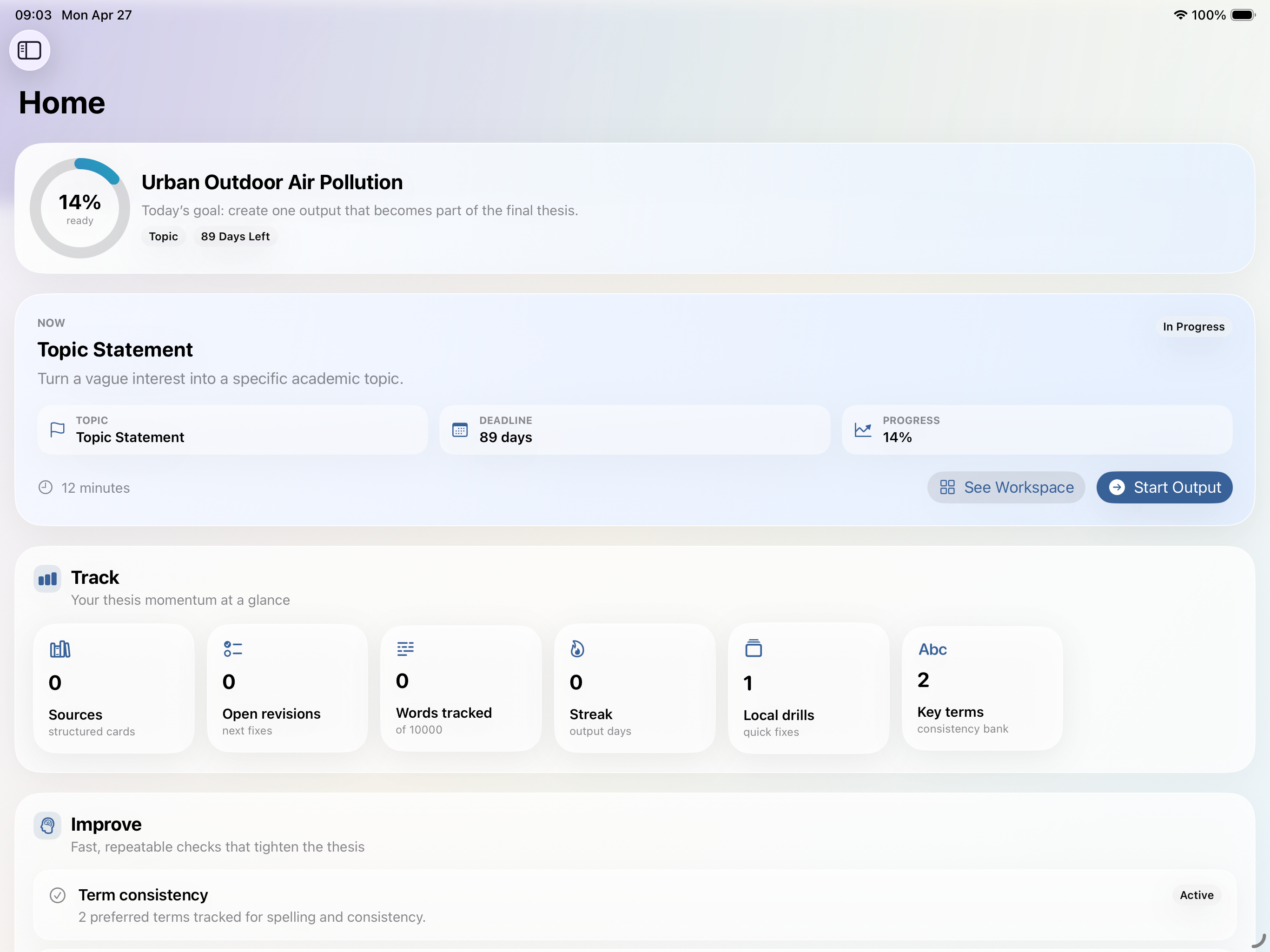
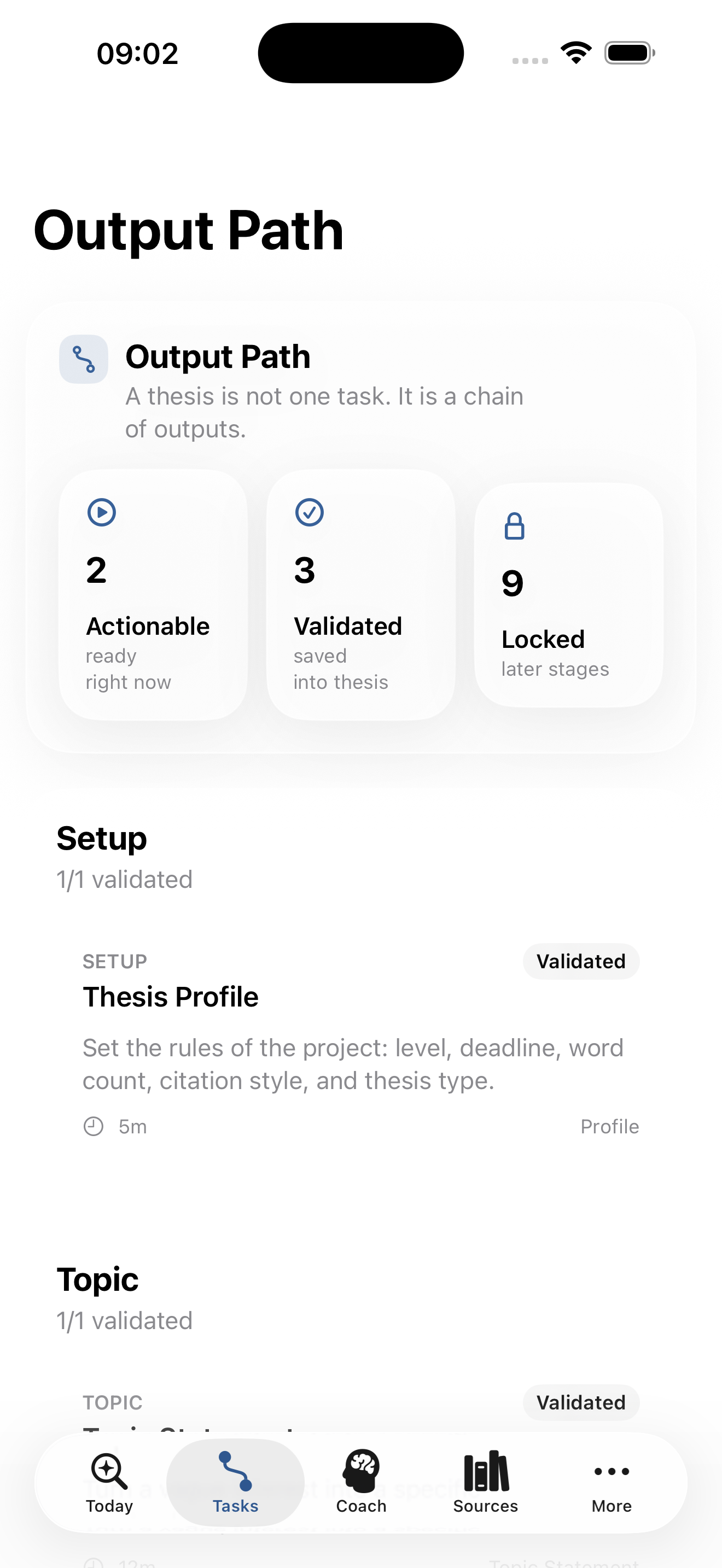
Real app UIDraft Studio now liveBuilt for iPad/Mac App + iPhone
The gap between meetings
Mentor meetings help. But they don’t finish the thesis for you.
Most students leave supervision with useful comments and zero clarity on the hundreds of tiny decisions that still need to happen next.
Add more critical analysis.
Strengthen your methodology.
Use more sources.
Clarify your argument.
Write Your F*cking Thesis fills that space with structure, not panic.
Core insight
A thesis is not one task.
It is a chain of smaller academic outputs. Every session should create, improve, or check something that belongs in the final thesis.
Set up thesisCapture sourcesDefine topicBuild questionProve the gapMap literatureJustify methodologyDraft sectionsRun checksSubmit
How it works
A calmer workflow for thesis chaos.
The app guides the next useful output, captures evidence fast, assembles the draft, and keeps every finished piece connected to the final submission.
Set up the thesis system
Add your subject, working title, degree level, word count, deadline, and thesis type so the app can build the right output path, draft scaffold, and submission checks.
Capture and structure evidence
Share references into the app, import PDFs, paste reading notes, and use AI Source Builder to turn rough material into structured source cards.
Build the thesis through outputs
Follow the Output Path, save finished work into Draft Studio, and watch the thesis assemble into real sections with targets, linked outputs, and source-backed writing blocks.
Check, revise, and export
Run Local Coach or AI Supervisor, turn weak spots into revision tasks and drills, then export the draft or full Markdown snapshot when you need something portable.
Features
Built for output, clarity, and momentum.
The product now covers the full thesis loop: capture, structure, draft, review, revise, and export.
Output Path
Know exactly what to do next with sequential thesis tasks instead of guessing the next move.
Draft Studio
Finished outputs assemble into a living thesis draft with section targets, linked sources, and re-check status.
AI Source Builder
Turn abstracts, rough notes, and reading scraps into structured source cards without fabricating missing citation details.
Shared Reference Capture
Send links and copied text into the app from the share sheet so sources land in the right thesis project.
PDF Import + Notes
Import a paper, extract readable text, and keep handwritten margin notes or argument sketches beside the source.
Literature Map + Chapters
Group sources into themes, debates, and chapter use instead of hoarding disconnected summaries.
Local Coach + Drills
Run on-device sweeps for spelling, consistency, citation cues, and draft fit, then turn issues into quick fix-it drills.
Revision Queue
Convert supervisor notes or weak checks into concrete revision tasks you can actually clear.
Submission + Export
Track draft readiness, AI-use declarations, and export the thesis as Markdown or draft sections as .txt and .md.
Just shipped
Draft Studio turns the workflow into a living thesis document.
Outputs no longer end as isolated tasks. They assemble into the thesis draft, stay editable, and carry their checks, sources, and revision state with them.
Outputs become draft sections
Save finished workflow tasks into the relevant part of the thesis so the real document keeps growing instead of disappearing into separate notes.
Edit the living thesis
Draft Studio is not a frozen export. Students can edit blocks directly, and the app tracks what changed and what needs re-checking.
Run checks where the writing lives
Local Coach, AI Supervisor, revision tasks, drills, and source links all sit close to the draft block instead of being scattered across separate tools.
Copy or export what you need
Copy the full draft, export whole sections, or generate .txt and .md versions when it is time to move writing into another system.
Real app UI
See the actual thesis workspace.
No stock photos. No fake dashboard energy. These are the real screens students use to move from source capture to draft building to submission checks.
iPad/Mac App
Source Bank
Turn readings into usable academic evidence with source cards, AI filling, PDF import, and reusable notes.
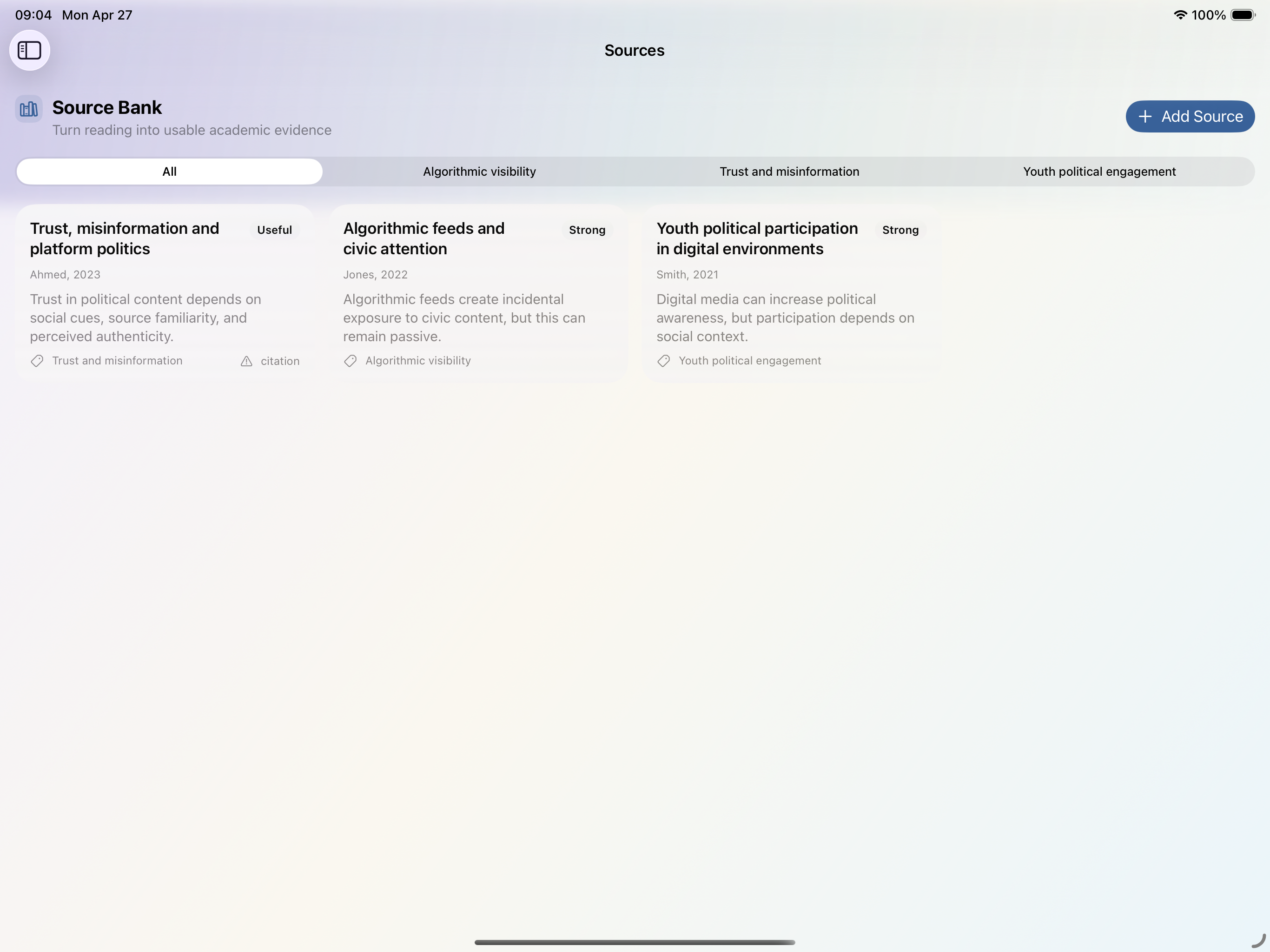
iPad/Mac App
Literature Map
Group themes, debates, gaps, and chapter use instead of dumping a stack of disconnected summaries.
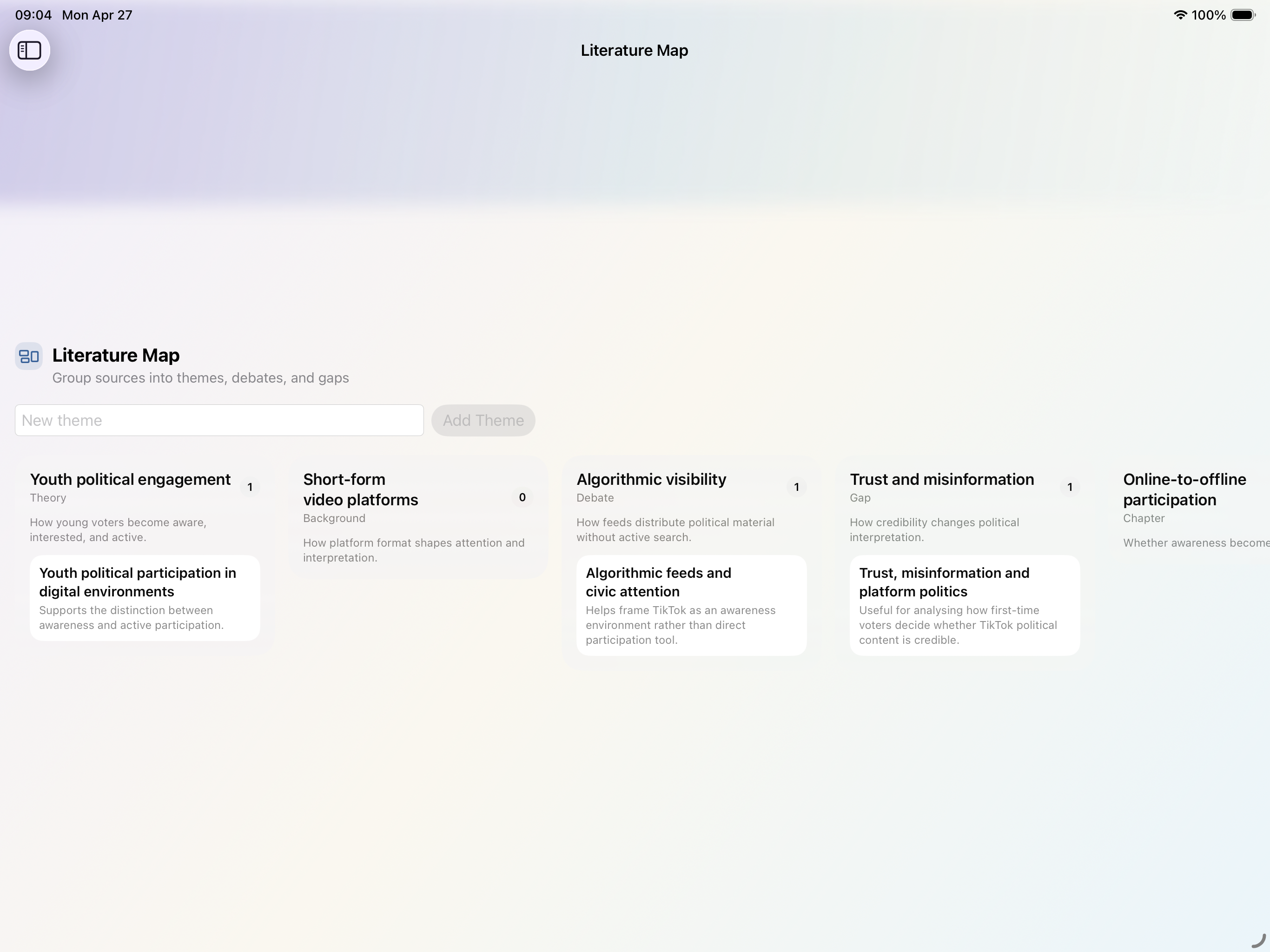
iPad/Mac App
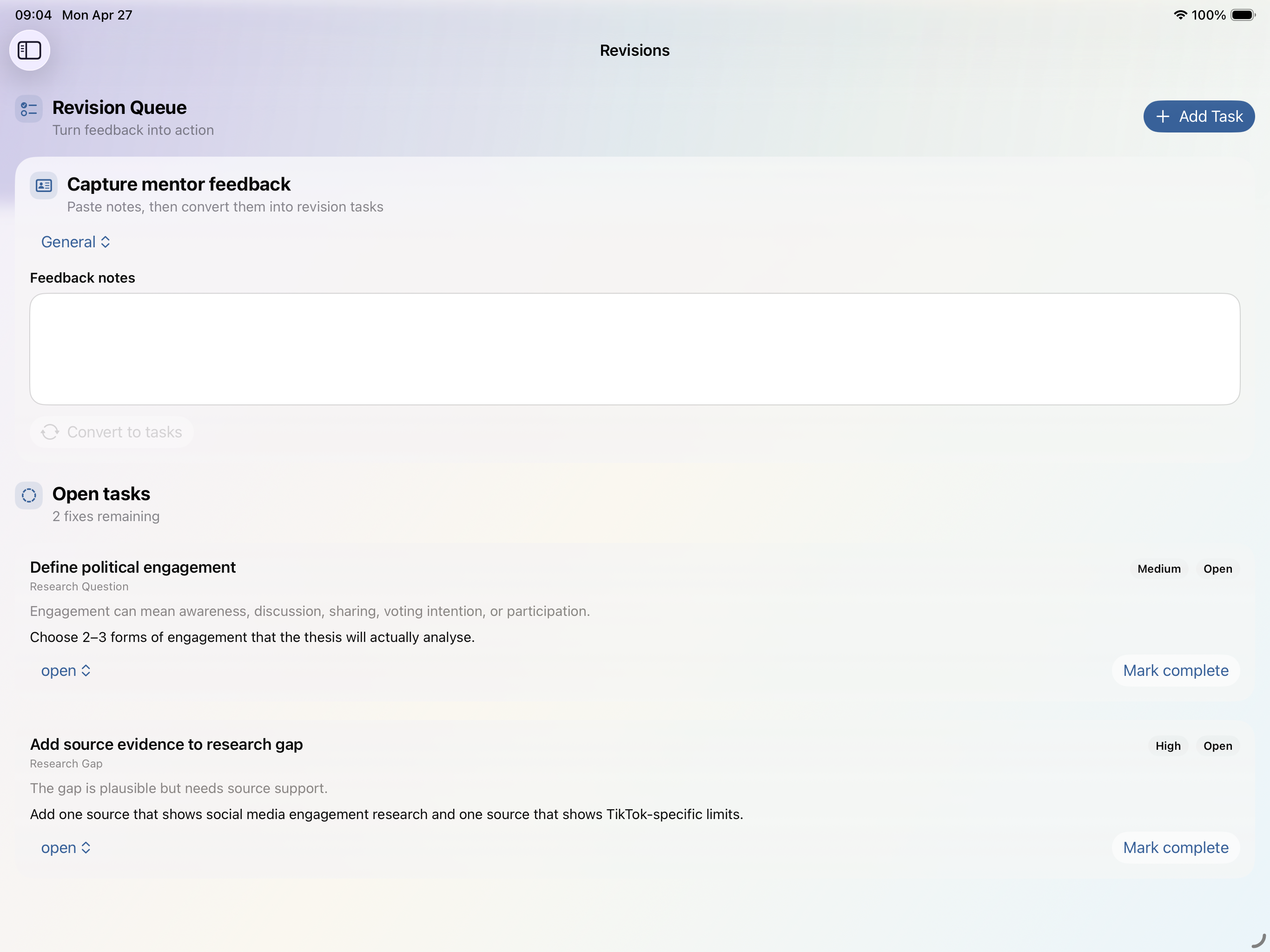
Revision Queue
Convert vague mentor feedback and weak checks into concrete tasks you can actually finish.
iPad/Mac App
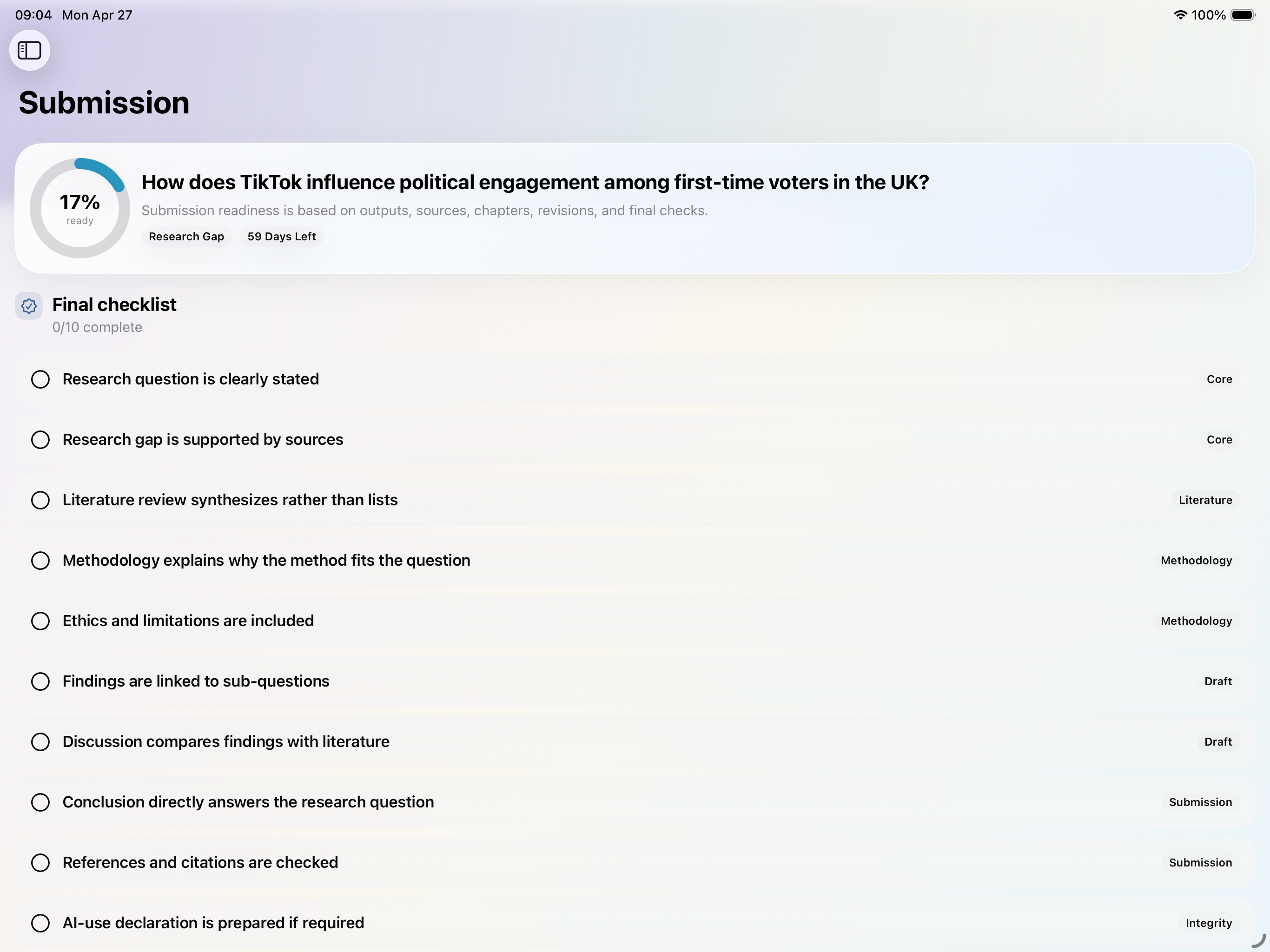
Submission Readiness
See draft-aware final checks, missing pieces, and export readiness before panic tries to run the deadline.
iPhone
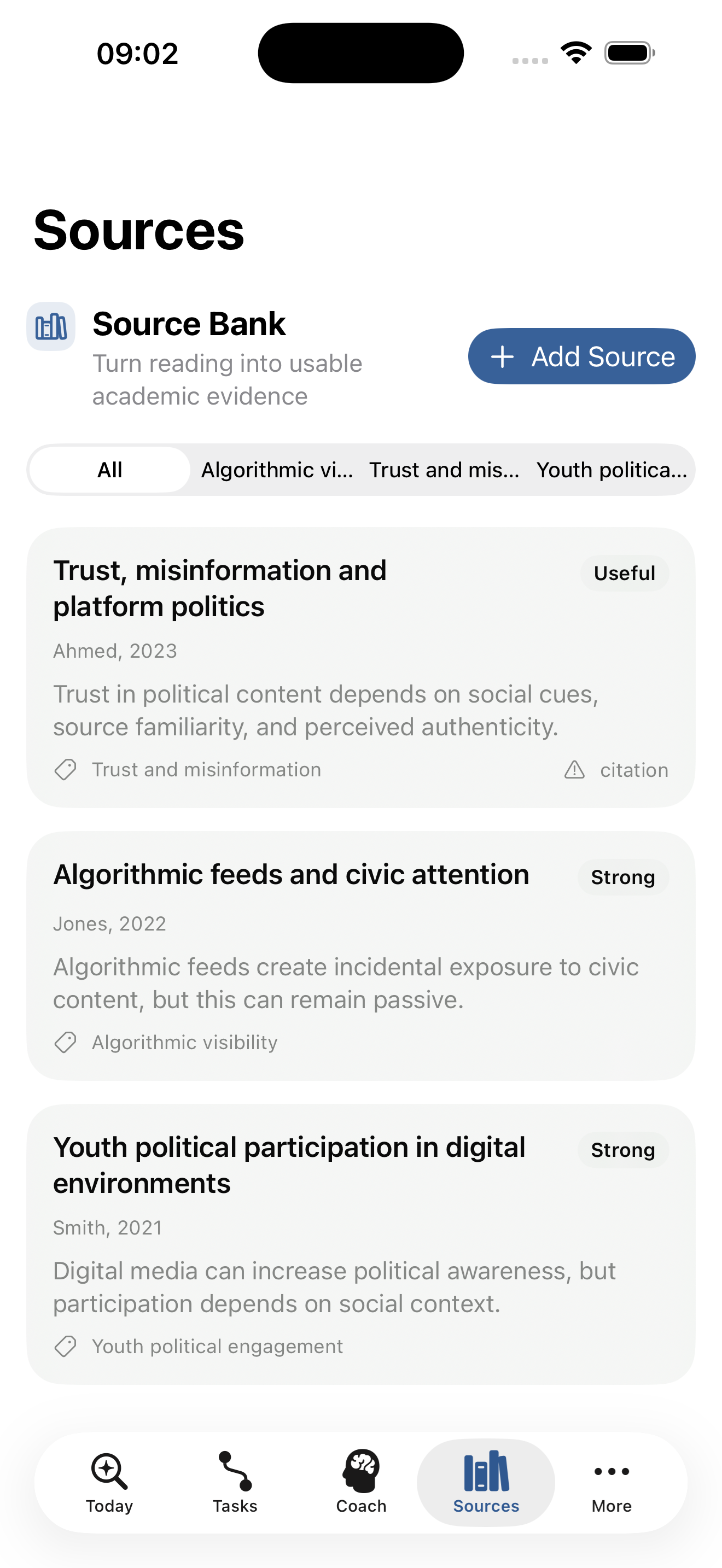
Quick Source Capture
Use iPhone to send links, copied text, and source notes into the thesis workspace when you only have a few spare minutes.
iPhone
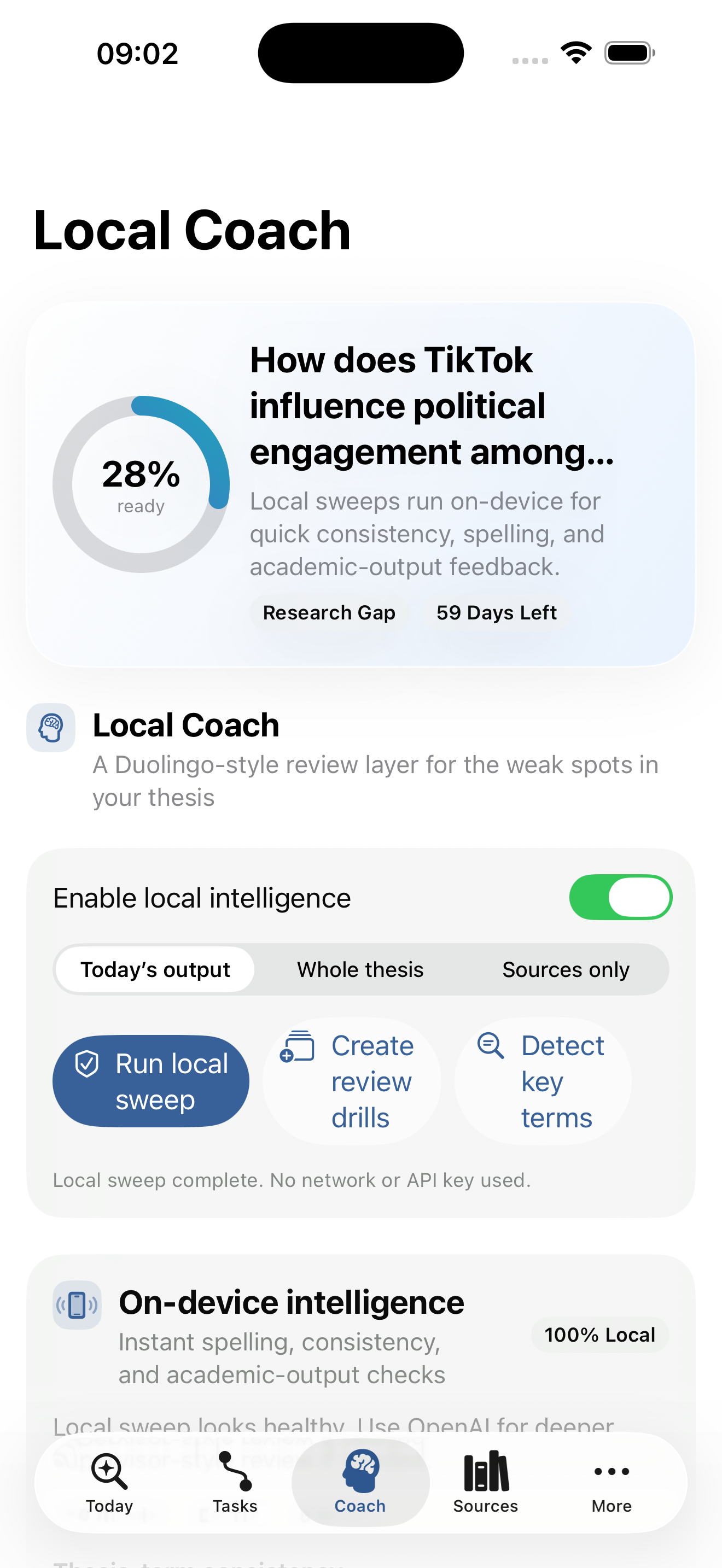
Local Coach
Run on-device checks for consistency, spelling, and academic-output weak spots, then turn them into drills.
Platform fit
Big work in the iPad/Mac App. Quick wins on iPhone.
Use the iPad/Mac App as the thesis studio for planning, drafting, mapping, and submission prep. Use iPhone when you need capture, quick fixes, or the next small move.
- Draft Studio with section targets
- Source bank with PDF import
- Literature map and chapter blueprint
- Submission readiness and Markdown export
- Handwritten source + chapter notes
- Today’s task
- Shared reference capture
- Quick source capture
- Local drills and mentor notes
- Fast thesis check-ins
Use cases
Built around the moments students actually get stuck.
This is not another vague study app. It is designed for the exact moments where thesis momentum usually dies.
I have notes, tabs, and PDFs everywhere.
What the app doesShare references into the app, import PDFs, pull out readable text, and turn rough notes into source cards before they disappear into a browser graveyard.
I keep finishing tasks but still don’t have a real draft.
What the app doesSaved outputs feed Draft Studio so the thesis turns into sections, blocks, and word targets instead of a pile of disconnected work.
My supervisor feedback becomes a guilt spiral.
What the app doesMentor notes convert into revision tasks, and draft blocks can trigger local drills or deeper AI review when the writing needs it.
I wrote a lot but I don’t know if it’s ready.
What the app doesSubmission Readiness checks the draft, missing sections, source coverage, unresolved revisions, AI-use declarations, and export readiness before deadline week gets loud.
Roadmap shipped
The thesis system is bigger than the first launch version now.
The live product now includes the feature work that used to sit on the roadmap: better capture, better drafting, better export, and better cross-device continuity.
Same-account iCloud sync
Your thesis data can appear across installed devices signed into the same Apple Account without a separate app login.
Personal OpenAI key support
Students can add a personal OpenAI key for AI features while the core thesis workflow stays local-first.
Shared reference inbox
Capture links, copied text, and notes from the iOS share sheet, then open them straight into the Source Bank for structuring.
PDF preview and extracted text
Import a PDF into a source card, preview the paper, and drop readable extracted text into the Source Builder when the file allows it.
Handwritten source and chapter notes
Use freehand note layers for source annotations, argument maps, section flow sketches, or supervisor reminders inside the app.
Draft-aware submission checks
Submission Readiness now reads the thesis document itself, including missing sections, source coverage, open revisions, and blocks that still need checking.
Academic integrity
Built for better academic work, not shortcuts.
Write Your F*cking Thesis helps you structure your thinking, check your work, and improve your own writing. It is designed to support responsible academic practice.
- Prompts, feedback, and structure
- Citation reminders
- Unsupported claim warnings
- AI-use declaration support
- Your writing stays your work
Pricing
AI support stays optional.
The core thesis path, Draft Studio, source workflow, local checks, and exports stay focused on structure and momentum. If students want AI Supervisor features, they can use their own OpenAI key.
AI Supervisor features use a personal OpenAI key while the rest of the thesis workflow stays local-first.
- Your OpenAI key stays in Apple Keychain
- OpenAI bills usage to your own account
- Deeper output, draft, and source feedback
- Supports your own writing, not ghostwriting
- On-device checks and structure still work without it
The app still works as a calm thesis system without the AI layer.
FAQ
What students usually ask first.
Straight answers about writing support, AI use, privacy, devices, and what the app is actually for.
Does Write Your F*cking Thesis write my thesis for me?
No. It helps you plan, structure, check, and improve your own work. You still do the thinking, drafting, defending, and submitting.
Can I use Write Your F*cking Thesis on Mac?
Yes. The full thesis studio is built for the iPad/Mac App, while iPhone is designed for quick tasks, capture, and lighter check-ins.
Do I need an OpenAI key?
No. Local on-device sweeps work without one. If students want AI Supervisor features, they can add their own OpenAI key in Settings.
Can I use my own OpenAI key in Write Your F*cking Thesis?
Yes. If a student uses their own OpenAI key, the app stores it in Apple Keychain. It can also follow their devices through iCloud Keychain when that Apple feature is enabled for the same account.
Does Write Your F*cking Thesis work without AI?
Yes. Draft Studio, source capture, revisions, submission checks, exports, and local sweeps still work without AI.
How much is AI support?
AI Supervisor features use a personal OpenAI key, and any usage charges come from OpenAI under the student’s own account. The core thesis path, Draft Studio, local checks, and workspace structure do not depend on AI.
Is this for bachelor’s or master’s students?
Both. The app is designed for bachelor’s dissertations, final-year projects, and master’s theses.
Can I use it on iPhone?
Yes. iPhone is built for quick tasks and capture, while the iPad/Mac App is the full thesis studio.
What is Draft Studio?
Draft Studio is the live thesis document inside the app. Outputs assemble into sections, students can edit blocks directly, link sources, run checks, create revisions, and export sections or the full draft.
How does Draft Studio work in Write Your F*cking Thesis?
Finished workflow outputs can be saved into the thesis draft, where they become editable sections and blocks tied back to checks, sources, revisions, and submission readiness.
Can I save workflow tasks into my thesis draft?
Yes. Completed outputs can be saved into Draft Studio so the thesis grows from real completed work instead of a separate blank document.
Can Write Your F*cking Thesis import PDFs?
Yes. Source cards can import PDFs, preview the paper, and reuse extracted text when the file exposes readable text.
Can I import PDFs or shared references?
Yes. Source cards can import PDFs, preview papers, and reuse extracted text when the file exposes it. On iPhone, links and copied text can also be sent into the app through the share sheet.
Can I share links or references into Write Your F*cking Thesis from iPhone?
Yes. Links, copied text, and notes can be sent into the app through the iPhone share sheet and then saved into the right thesis project.
Can I take handwritten notes on thesis sources or chapters?
Yes. The app supports handwritten note layers for source annotations, argument maps, section flow sketches, and chapter notes.
Can I export my draft or thesis snapshot?
Yes. Draft sections and the full draft can be exported as .txt or .md, and Submission can export a wider Markdown snapshot of the thesis workspace.
Can I export my thesis draft to Markdown?
Yes. Submission can export a portable Markdown snapshot of the thesis workspace, and Draft Studio can export the full draft or individual sections as text or Markdown.
Does it sync across my devices?
Yes. Thesis data syncs through the app’s private iCloud database across devices signed into the same Apple Account, and AI preferences sync through Apple’s iCloud preferences system.
Does Write Your F*cking Thesis use iCloud sync?
Yes. Thesis data uses the app’s private CloudKit database for the same Apple Account. AI preferences also sync through iCloud preferences, and a personal OpenAI key can follow through iCloud Keychain when that Apple feature is enabled.
Do I need a login?
No separate app login is required. The app uses Apple services already tied to the device for iCloud sync, iCloud Keychain, and distribution through the App Store or TestFlight when those Apple features are available.
Is my work private?
Thesis data is stored locally and can also sync through Apple’s private CloudKit database across a student’s own devices signed into the same Apple Account. If they run AI features with their own key, the relevant prompt content is sent to OpenAI. Exports leave the app only when the student chooses to save or share them elsewhere.
Does it replace my supervisor?
No. It helps you prepare better work between meetings so your supervisor time goes further.
What subjects does it support?
Best at launch for humanities, social sciences, business, education, media, law-adjacent, and other thesis-heavy subjects.
Get the app
Your thesis does not need more panic. It needs a path.
Download the app, start with one output, and keep going until submission.